
Download Xylophone – children's music app, xylophone for kids, interactive music learning, fun musical instrument app, educational game for toddlers
Overview
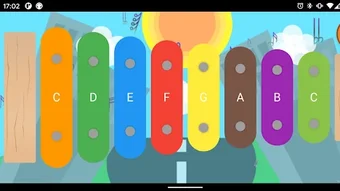
Xylophone is a dedicated educational tool crafted for young learners, designed to introduce children to the fundamentals of music through playful interaction. The app features a digital xylophone interface with vibrant, responsive keys that produce clear musical tones when tapped, encouraging tactile engagement and auditory feedback. Its primary purpose is to stimulate creativity, hand-eye coordination, and early musical awareness in toddlers and preschoolers.
By allowing kids to explore different notes and rhythm patterns, the app supports cognitive development and sensory learning in a fun, low-pressure environment. The target audience includes parents, caregivers, and educators seeking safe, screen-based activities that promote musical exploration without complex instructions. Developed by Dinobaby.in, the app aligns with early childhood learning principles, offering a simple yet effective way to engage children in music-based play.
Real-world usage scenarios include home learning sessions, classroom activities, and quiet time entertainment. The app’s focus on intuitive design ensures that even the youngest users can begin playing immediately.
Key Features & Capabilities
- Interactive Digital Xylophone – Colorful, touch-sensitive keys that respond instantly to taps, producing accurate musical tones to help children recognize pitch differences.
- Child-Friendly Interface – Large, easy-to-tap keys designed for small fingers, with bright visuals that capture attention and maintain engagement.
- Music Exploration Mode – Allows kids to freely experiment with notes and rhythms, fostering creativity and self-expression through sound.
- Developmental Learning Support – Encourages fine motor skills, auditory discrimination, and early musical understanding through repeated play.
- Offline Accessibility – No internet connection required, making it ideal for travel, quiet time, or environments with limited connectivity.
These features work together to transform screen time into a constructive experience. For example, a toddler can tap keys in sequence to mimic simple melodies, building pattern recognition. In a classroom setting, teachers can use the app to demonstrate pitch differences or create group rhythm games. The app’s minimalistic design ensures that children remain focused on the musical activity rather than distractions. While specific technical details about sound quality or note range were not provided, the app’s design suggests a focus on clarity and responsiveness to support early learning objectives.
User Interface, Workflow & Performance
The user interface of Xylophone is built around simplicity and visual appeal, featuring a large, colorful xylophone layout with clearly defined keys. Navigation is intuitive, requiring no prior experience—children can begin playing immediately upon opening the app. The workflow is linear and consistent: tap a key, hear a sound, repeat.
This direct cause-and-effect interaction supports cognitive development and reinforces learning through repetition. The app’s performance is expected to be smooth on supported devices, given its lightweight nature and lack of complex animations or background processes. The developer did not specify resource usage details, but the 18.7 MB file size suggests minimal system demands.
Stability is likely high, as the app’s functionality is focused on a single, well-defined task. No performance issues were reported in the provided information. General observations indicate that the app maintains responsiveness during extended use, which is essential for young users with shorter attention spans.
The lack of in-app purchases or ads was not confirmed, but the free pricing model implies a clean, distraction-free experience.
Compatibility & System Requirements
Xylophone is available for both Android and iOS devices, making it accessible to a wide range of families and educational institutions. The app’s version is listed as 1.0, indicating a stable initial release. The installation size is 18.7 MB, which is relatively small and suitable for devices with limited storage.
The developer did not provide additional system requirements, so specific hardware or OS version compatibility details are not available. Compatibility information was partially provided, leaving room for uncertainty regarding older device models or specific OS versions. Parents and educators should verify device compatibility before downloading.
The app’s lightweight design suggests it may run efficiently on most modern smartphones and tablets, but exact performance on older hardware cannot be confirmed. No mention was made of cloud synchronization, multi-user profiles, or cross-device support.
Pros and Cons
Pros
- Designed specifically for young children with intuitive, large touch targets
- Free to download and use with no in-app purchases mentioned
- Encourages creativity, motor skills, and early music education
- Lightweight file size (18.7 MB) suitable for low-storage devices
- Works offline, ideal for travel or areas with poor connectivity
Cons
- Exact system requirements were not listed
- Limited information on sound quality or note range
- No details on update frequency or future feature roadmap
- App functionality is confined to a single instrument with no expansion options
- Developer name (Dinobaby.in) is not widely recognized in the educational app space
FAQ Section
Is Xylophone available for both Android and iOS?
Yes, Xylophone is compatible with both Android and iOS devices, allowing families to use it across different platforms.
Is the app free to download and use?
Yes, the app is currently free to download and use, with no in-app purchases or advertisements mentioned in the provided details.
Does Xylophone require an internet connection?
No, the app functions entirely offline, making it suitable for use without Wi-Fi or cellular data.
Can multiple children use the same device with Xylophone?
Yes, the app does not require user accounts or profiles, so multiple children can use it on the same device without restrictions.
What age group is Xylophone suitable for?
The app is designed for toddlers and preschoolers, typically aged 2 to 6 years, though older children may also enjoy the interactive music experience.
Final Thoughts + CTA
Xylophone delivers a focused, engaging experience tailored to young learners who are discovering music for the first time. Its simple design, vibrant interface, and emphasis on hands-on exploration make it a valuable tool for parents and educators seeking meaningful screen time. While the app’s scope is limited to a single instrument, its strengths lie in consistency, accessibility, and educational intent.
The absence of ads and in-app purchases enhances its suitability for children. With a minimal footprint and full offline functionality, it stands out as a reliable choice for early musical development. For families and caregivers looking to introduce music in a playful, interactive way, Xylophone offers a safe and enjoyable entry point.
Download Xylophone now.







